Unlocking Playful Design with the Snow Caps Font
There is a specific moment in a design project where you realize the standard sans-serif or serif fonts just aren't cutting it. You are working on a children’s educational app, a whimsical bakery logo, or a holiday marketing campaign, and the typography feels too rigid, too serious, or too corporate. You need something that evokes joy, texture, and personality instantly. This is exactly where decorative typefaces come into play, specifically those designed to mimic the tactile quality of craft materials. If you are looking to inject a sense of fun and nostalgia into your work, understanding how to utilize a font like Snow Caps can be a game-changer for your visual communication strategy.
The Visual Appeal of Dimensional Typography
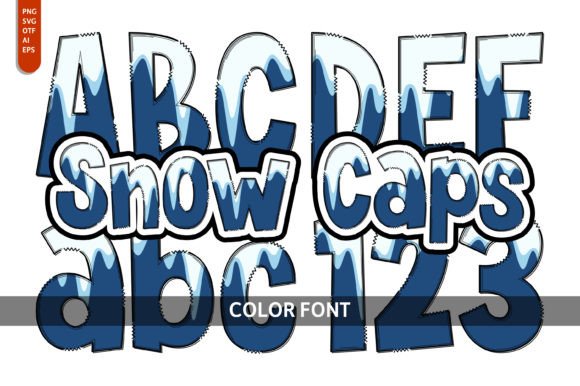
What makes a typeface like Snow Caps stand out in a sea of flat digital text is its visual weight and dimensionality. Unlike standard vector text that looks two-dimensional, this font is designed to look like it is made of physical material—reminiscent of snow, icing, or soft, plush fabric. This creates a "color font" experience, specifically utilizing the Opentype-SVG format. This technology allows the font file to contain high-fidelity details and colors, meaning the letters look textured and realistic right out of the box without requiring manual beveling, shadowing, or 3D effects in your design software.
For designers, this solves a massive problem: time. Creating a "puffy" or "snowy" text effect manually in Adobe Illustrator or Photoshop can take hours of layering, masking, and shading. With a specialized display font, that effect is baked into the typeface itself. The result is a whimsical, colorful aesthetic that is immediately engaging. It appeals to the tactile senses, making it perfect for audiences who appreciate a handcrafted or playful artistic style. Whether you are designing for winter festivities or creating branding for a toy store, the visual impact of dimensional typography is undeniable.
Strategic Applications for Creative Professionals
While the aesthetic is playful, the application of a font like this should be strategic. It is not a typeface for body copy; it is a high-impact display font meant for headlines, logos, and short bursts of text. Here is how different professionals can leverage this style across various mediums:
Branding and Logo Design
For businesses targeting families, children, or the food industry, a font with a playful texture can define the entire brand identity. Imagine a logo for a pediatric dentist, a frozen yogurt shop, or a toy boutique. Using Snow Caps for the wordmark immediately communicates that the brand is friendly, soft, and approachable. It moves the brand away from corporate stiffness and toward visual warmth.
Packaging and Merchandise
Physical products rely on shelf presence. If you are designing packaging for holiday treats, hot cocoa mixes, or bath bombs, a snow-cap style font adds a premium, tactile feel to the label. It suggests the product inside is fun and high-quality. Furthermore, this style translates exceptionally well to merchandise like tote bags, t-shirts, and mugs, where bold, graphic text is required to catch the eye from a distance.
Digital Marketing and Social Media
In the fast-scrolling environment of Instagram, TikTok, or Pinterest, you have milliseconds to grab attention. A standard font often blends into the background. However, a textured, colorful display font acts as a visual stop-sign. It is excellent for "New Arrival" announcements, holiday sale banners, or YouTube thumbnails. The whimsical nature of the font can increase engagement rates because it breaks the monotony of the standard social media feed.
Invitations and Editorial Design
The font description explicitly mentions its utility in greeting cards and invitations, and for good reason. For wedding stationery (specifically winter themes), children's birthday invites, or scrapbooking, the font does the heavy lifting of setting the mood. In editorial layouts, such as magazine covers or book headers for young adult fiction, it provides a strong focal point that guides the reader's eye.
Technical Compatibility and Workflow Integration
Before committing to a specialized font for a professional project, you must understand the technical requirements. Because Snow Caps is an Opentype-SVG color font, it behaves differently than standard .TTF or .OTF files. The SVG technology is what allows for the multi-colored, textured appearance within a single glyph.
However, this comes with specific compatibility requirements that are crucial for a smooth workflow. This font is compatible with industry-standard design software, specifically:
- Adobe Photoshop
- Adobe Illustrator
- Silhouette Studio
- Inkscape
It is vital to note the limitations regarding cutting machines. While the font works in Silhouette, the OTF and TTF files are not compatible with Cricut Design Space. Cricut does not currently support the complex SVG data required to render the colors and textures of this font. If you are a crafter using a Cricut machine, attempting to use this font will likely result in a generic, flat outline or an error message. Always verify your software version supports color fonts before purchasing design assets.
Matching Typography to Project Goals
Choosing a font is about more than just picking something "pretty"; it is about matching the typeface personality to the project goals. When you use a font like Snow Caps, you are making a deliberate choice to prioritize audience engagement and brand recognition over minimalist subtlety.
Here are a few practical tips for integrating this style into your work:
1. Contrast is Key
Because this font is bold, textured, and busy, it pairs best with clean, simple typefaces. If you pair a whimsical snow font with a complex script or a grunge font, the design will look cluttered and unreadable. Try pairing it with a clean sans-serif (like Montserrat, Lato, or Open Sans) for any supporting text. This ensures that the headlines pop while the body text remains legible.
2. Readability Considerations
Display fonts with heavy textures should generally be used for short text—headlines, sub-headers, or single words. Avoid using a font like this for a full paragraph or a "Read More" button, as the texture can make it difficult to read at small sizes. Use it for impact, not for information delivery.
3. Color and Background
Since this is a color font, the colors are embedded. However, the background you place it on matters. High-contrast backgrounds (white, dark navy, or bright reds) usually work best to make the font details stand out. Be careful placing a textured font on top of a busy photograph, as the text may get lost in the image noise. Using a solid color overlay or a drop shadow can help separate the text from the background.
Licensing and Commercial Usage
For entrepreneurs and small business owners, understanding the license of your design assets is just as important as the design itself. A "premium font" usually comes with a license that dictates how you can use it. Generally, fonts like these are licensed for both personal and commercial use, allowing you to use them on products you sell, such as t-shirts, mugs, or digital planners.
However, you typically cannot redistribute the font file itself. You cannot upload the raw font file to a website for others to download, nor can you sell it as part of a "font bundle" product. Always read the specific End User License Agreement (EULA) provided with the download. If you are working for a large agency or a corporation, ensure the license covers the scope of your specific client's usage.
Ultimately, the Snow Caps font represents a specific niche in modern typography: the intersection of digital convenience and handcrafted charm. By leveraging its unique SVG capabilities, you can create designs that feel tactile, festive, and deeply engaging, helping your projects stand out in a crowded visual landscape.